 Strewn
Fold bursts and near-duplicates without deleting anything
When you pick several frames of the same moment, Strewn keeps the sharpest one in the dump and moves the others to a Set aside tray. The tray lists each photo with a reason, lets you add any back, and never deletes a file from your photo library.
Coming soon to iPhone
How does Strewn spot near-duplicates?
Each photo gets a 64-bit difference hash computed from a tiny grayscale thumbnail. Strewn lines the photos up by capture time, falling back to the order you picked them. Any photo whose hash differs by 10 bits or fewer from a photo already in a group joins that group. Strewn keeps the sharpest frame of each group and sends the rest to Set aside as Twin of slide n.
The idea is the same one behind perceptual hashing: visually similar images produce similar hashes.
A threshold of 10 bits out of 64 is deliberately cautious. It folds true bursts and near-identical frames while leaving similar-but-different photos, such as two angles of one meal, in the dump.
What happens between picking and the finished dump?
Folding is one stage in a short pipeline, and it helps to know where it sits:
- Strewn copies each picked photo, resized to 1600 px on the long side, into its own storage.
- It reads a 64 pixel wide thumbnail of the copy and computes sharpness, brightness, contrast, saturation, hue, warmth and the hash.
- It groups near-identical photos and keeps the sharpest of each group.
- From the survivors it chooses as many as your slide count allows.
- It orders those slides and shows the sorting screen counters: photos read, bursts folded and whether a chaos slot was found.
What do I see on screen?
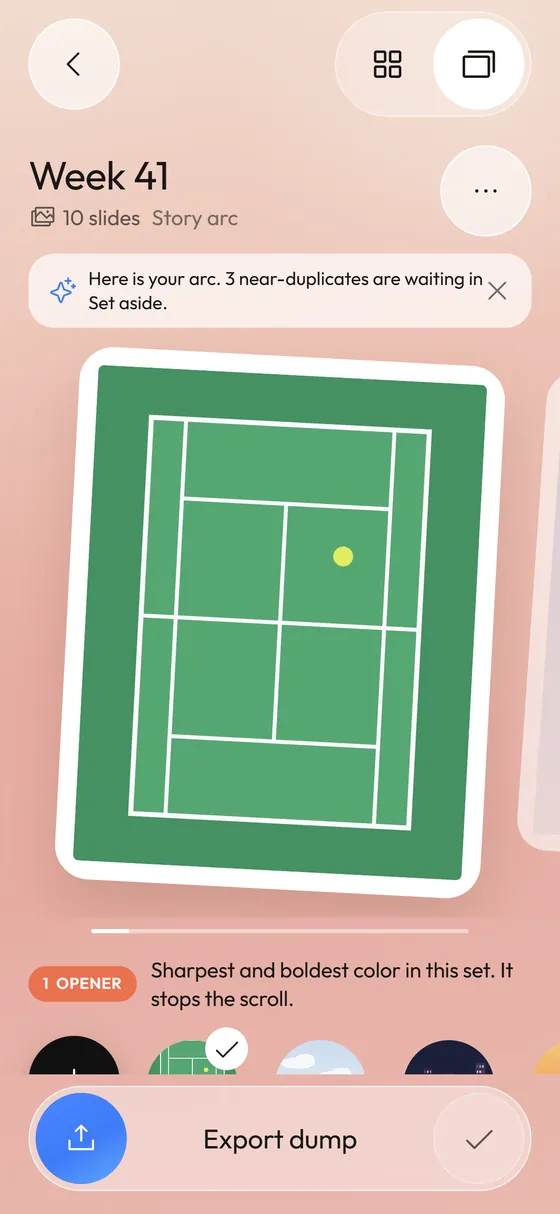
On the sorting screen a line reads something like 6 bursts folded into one photo each. In the editor, a tip under the slide says how many near-duplicates are waiting in Set aside. The Set aside pill in the footer shows the total count of left-out photos.
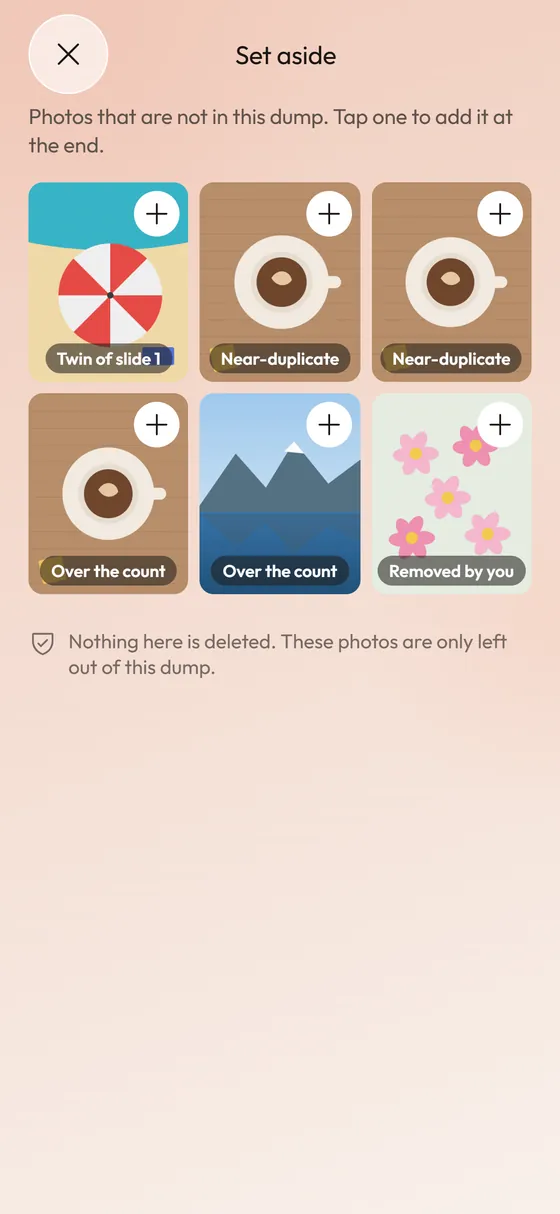
Inside the tray, each photo carries one of five badges: Near-duplicate, Over the count, Removed by you, Could not be read, or Twin of slide n. A footer line repeats that nothing is deleted. Tap a photo and the button reads Add to dump.
What is the Set aside tray?
A grid of every photo that is not in the dump, each with a badge: Twin of slide 3, Over the count (a photo beyond the slide count), Removed by you or Could not be read. Tap one to add it to the end of the dump, or open the tray from Replace to swap it into a chosen slide.
The footer says it plainly: nothing here is deleted, these photos are only left out of this dump.
What does Strewn do when a file cannot be read?
A photo that fails to load is skipped and counted as unreadable, kept at the end of the list instead of stopping the sort. You see the count on the sorting screen along with the bursts folded and the chaos slot found.
Does it touch my photo library?
No. Strewn works on copies it makes of the photos you pick (resized to 1600 px, stored in its own space). The Remove button in the editor sends a slide to Set aside. Deleting a dump removes only Strewn's copies. Me, then Your data, shows what is stored and offers a full wipe of Strewn data with a typed confirmation.
What are the limits of the folding?
The hash compares the rough layout of light and dark, not what is in the photo. Two frames of the same scene almost always fold. Two different subjects shot against the same plain background can occasionally look alike to the math and fold too. If a photo you wanted ends up in the tray, add it back.
The threshold is fixed at 10 bits and has no setting. A burst whose sharpest frame has closed eyes will still keep that frame, since sharpness is the only judge. Those are the cases the tray exists for.
Strewn also folds only among the photos you picked. Duplicates elsewhere in your library are none of its business, and it never goes looking.
How is this different from a duplicate cleaner?
Duplicate cleaners scan a whole library and offer to delete the extras, which frees storage. Strewn does a smaller job. It works on one pick, for one dump, and only decides what to leave out of that dump. The originals stay in Photos either way.
That makes it a good companion rather than a replacement. If you want to reclaim space, use a tool built for that. If you want ten good slides from sixty, folding does the first cut for you.
When would I want a twin back?
Bursts hide small differences: a blink, a gust of hair, a better smile. If the sharpest frame is not your favorite, open Set aside and swap the twin in. Strewn picks by sharpness, you pick by feeling.
Frequently asked questions
Is a near-duplicate the same as a burst?
Strewn treats both the same way. If two photos look almost identical and sit next to each other, only the sharpest stays in the dump.
Can I get a folded photo back?
Yes. Every folded photo sits in Set aside, and one tap adds it back to the dump.
Will Strewn delete the originals from Photos?
No. Strewn cannot change or delete anything in your photo library.
What does Over the count mean in Set aside?
It marks a photo you picked that did not fit into the slide count you chose. Raise the count or add it manually.
Why did a photo I wanted end up in Set aside?
Either it looked almost identical to a sharper frame, or it fell past your slide count and is marked Over the count. Tap it in the tray and choose Add to dump.
Can I change how strict the folding is?
No. The threshold is fixed at 10 bits out of 64. You can add any folded photo back by hand.