Strewn
Write a photo dump caption with prompts, not a blank field
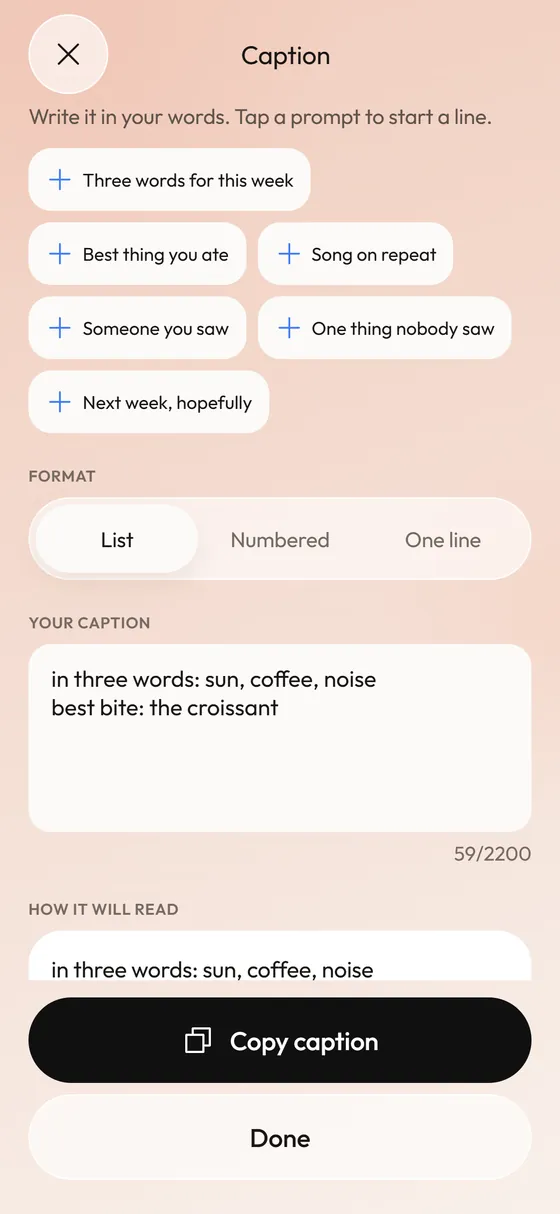
The Caption screen offers prompt cards such as three words for this week, best thing you ate and song on repeat. Tap one to insert a line starter, write your own answer, then choose list, numbered or one-line format. Nothing is generated for you.
Coming soon to iPhone
What prompts does Strewn offer?
Six prompt cards sit above the text field:
Prompts are line starters. Tapping one adds the first words to the field, and you finish the thought.
- Three words for this week
- Best thing you ate
- Song on repeat
- Someone you saw
- One thing nobody saw
- Next week, hopefully
How do the three formats read?
A segmented control under the prompts picks the shape. List puts each line on its own row. Numbered adds 1, 2, 3 in front, which suits a dump where the caption mirrors the slides. One line joins everything into a single string. A live preview below the field shows how it will read.
How long can a caption be?
The field holds up to 2,200 characters and shows a counter as you type. Copy caption puts it on the clipboard with a short confirmation, ready to paste into the post.
Instagram allows captions of up to 2,200 characters, which is the limit the field uses.
Why no generated captions?
A dump is personal, and the caption is half of why. Strewn gives a starting line and leaves the words to you. That also keeps the app free of any text model, which is part of why it can promise that nothing leaves your iPhone.
Where does the caption live?
It is saved on the dump, so reopening the dump later brings it back along with the slide order and export settings.
Frequently asked questions
Does Strewn write the caption for me?
No. It offers prompts and formatting. The words are yours.
Can I use my own prompts?
The prompt cards are fixed in the current version. You can type anything you like in the field.
Does the caption export with the slides?
The caption is copied to the clipboard on request. The exported images are the slides and collages only.