 Strewn
Strewn vs Lately: which photo dump generator?
Lately builds a finished, designed carousel from hundreds of photos and removes blurry shots, duplicates and closed eyes. Strewn proposes an order for the 10 to 60 photos you pick, explains each slide and leaves design and captions to you. Facts below are as of October 2026.
Coming soon to iPhone
What is the main difference?
Both apps target the same chore: turning a pile of photos into a photo dump quickly, and both say the work happens on the phone. They differ in how much they decide. Lately picks photos from a whole album and lays them out in a designed carousel. Strewn works on a set you choose, sorts it into a story arc and gives a plain-words reason for every slide, then frames each slide the same way.
Lately facts come from its US App Store listing, retrieved on October 10, 2026. Strewn is in development and has no listing yet.
How do they compare at a glance?
This table uses the listing text for Lately and Strewn's own documentation:
| Strewn | Lately | |
|---|---|---|
| Starting point | 10 to 60 photos you pick | Hundreds of photos, whole albums |
| Who picks the slides | Strewn proposes, you can swap anything | Lately selects the strongest photos |
| Blurry shots | Loosest readable one kept as a deliberate slide | Removed, per its listing |
| Duplicates | Sharpest of each burst kept, twins in Set aside | Removed, per its listing |
| Closed eyes | Not detected, no face recognition | Removed, per its listing |
| Layout | Same frame for every slide, 4:5 free | Designed carousel layouts, layered scrapbook styles |
| Reason shown | One line per slide | Not described on its listing |
| Captions | Prompts, you write | Not described on its listing |
| Privacy | Photos stay on the phone, no account | Everything local per its listing |
| Availability | Not on the App Store yet | On the US App Store, released August 2026 |
What does Lately do better?
Speed and design. By its listing, Lately takes an imported album and returns a finished carousel in under a minute, with layered layouts and tools to replace photos, move layers, resize, crop, reorder and add more. It also claims to catch closed eyes, which needs face analysis that Strewn does not do. If you want a polished, designed result with minimal choices, Lately fits.
It is also an App Store app today, with a version 1.0.3 update dated September 2026 and a minimum of iOS 17.0. Its listing shows a single rating at the time of writing, so there is little public feedback to judge yet.
What does Strewn do better?
It explains itself. Each slide has a role, Opener, Breather, Chaos slot, Detail, Energy or Closer, and a one-line reason, such as sharpest and boldest color in this set. You can see what the rules saw and overrule it with Swap. Strewn also keeps the deliberate loose photo near slide 4, because a dump feels real when it is not all polished. How the order works lays out the rules.
Nothing is thrown away. Near-duplicates and extra photos wait in a Set aside tray with a badge for why, and your library is never touched. See burst folding. You also write the caption yourself, using prompts. Nothing is generated.
How do the two handle privacy?
Both describe local processing. Lately's listing says photos never leave the device and are not processed with AI. Strewn uses plain pixel math on a 64-pixel preview, has no account, no analytics and no network calls of its own, and sees only the photos you pick in the system picker. The only network traffic on iPhone is the purchase check. Read Strewn's privacy notes and the app's privacy policy. Check Lately's privacy label on the App Store for its own details.
Who should pick which?
A quick guide:
- Pick Lately if you have a huge album, want the app to choose and design for you, and care about closed-eye removal.
- Pick Strewn if you want to choose the photos, understand the order and keep a loose frame on purpose.
- Pick Strewn if you want a weekly routine with a reminder, a streak and a monthly recap.
- Pick Lately if you want to start today, since Strewn is not released.
What are the trade-offs of auto-selection?
Letting an app pick for you saves time but moves the taste decision to its rules. Removing every blurry shot also removes the ones you might keep on purpose. Strewn keeps one loose photo in the chaos slot by design, and shows its reason so you can disagree. Lately's listing describes removing poor quality images and letting you replace photos afterward. Both give you an exit, and the question is which default you prefer.
Can they work together?
Yes. A designed Lately carousel and a Strewn dump answer different moods. You might use Lately for a wedding album of 400 photos, and Strewn for a casual weekly post. For a wider view, see the best photo dump apps and the earlier SelfieDump comparison.
Frequently asked questions
Is Lately the same kind of app as Strewn?
They are close. Both turn many photos into a dump on the phone. Lately designs a carousel automatically, and Strewn orders your picks and leaves design to you.
Does Strewn remove closed-eye photos?
No. Strewn does not recognize faces. It ranks by sharpness, light and color, and you check expressions yourself.
Which app removes duplicates?
Both. Strewn folds near-duplicates into a Set aside tray without deleting anything, and Lately's listing says it removes duplicate shots.
Is Strewn available now?
Not yet. It is in development and not on the App Store as of October 2026.
Do I need an account?
Strewn has no account. Check Lately's App Store privacy label for its terms.
Keep exploring
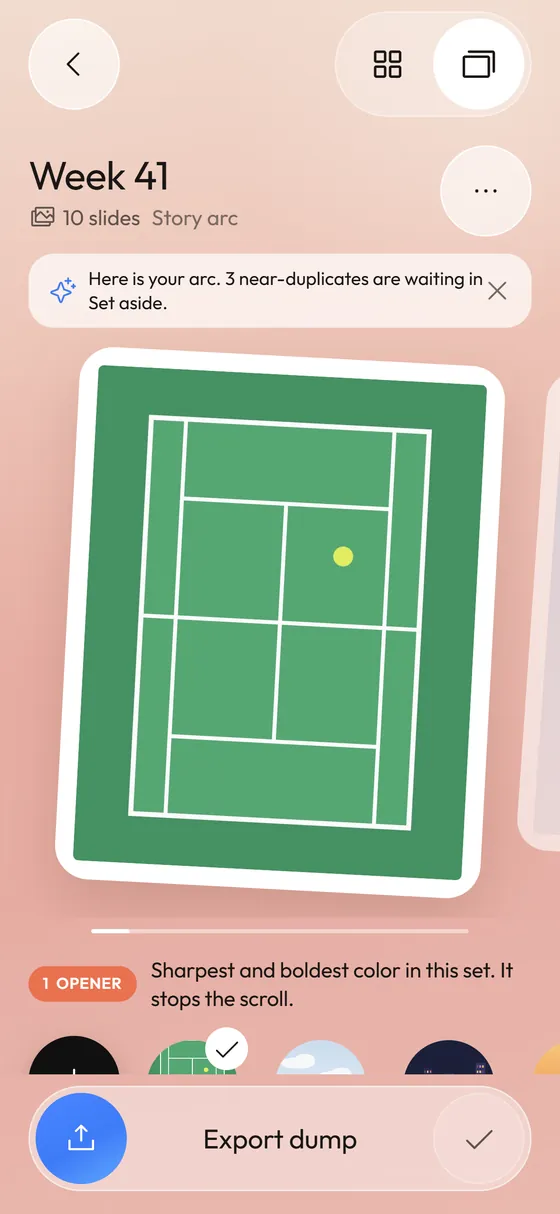 Photo Dump OrderA story-arc order with a reason for every slide.Private Photo OrganizerSystem picker, on-device analysis, no account, no analytics.